Free sample lesson · Web Development: From Basics to Full-Stack
What Happens When You Type a URL
mozilla.org is not the site's real address. What does your browser look up first?
Lesson 1 of the Wondering course Web Development: From Basics to Full-Stack
A Name Is Not Enough
Type mozilla.org. Your browser cannot route to that name; it first asks DNS for an IP address, such as 192.0.2.172.[[2]](https://developer.mozilla.org/en-US/docs/Learn_web_development/Getting_started/Web_standards/How_the_web_works)
A domain name is a human-friendly lookup key. The network uses the IP address to reach a server.
- Domain name
- IP address
Large sites use several servers, so the address can differ by location. The website does not live at its name.[[2]](https://developer.mozilla.org/en-US/docs/Learn_web_development/Getting_started/Web_standards/How_the_web_works)
Client Asks, Server Answers
Who is talking? The client is your device plus browser. It requests a page; the server stores the site and sends a copy back.[[2]](https://developer.mozilla.org/en-US/docs/Learn_web_development/Getting_started/Web_standards/How_the_web_works)
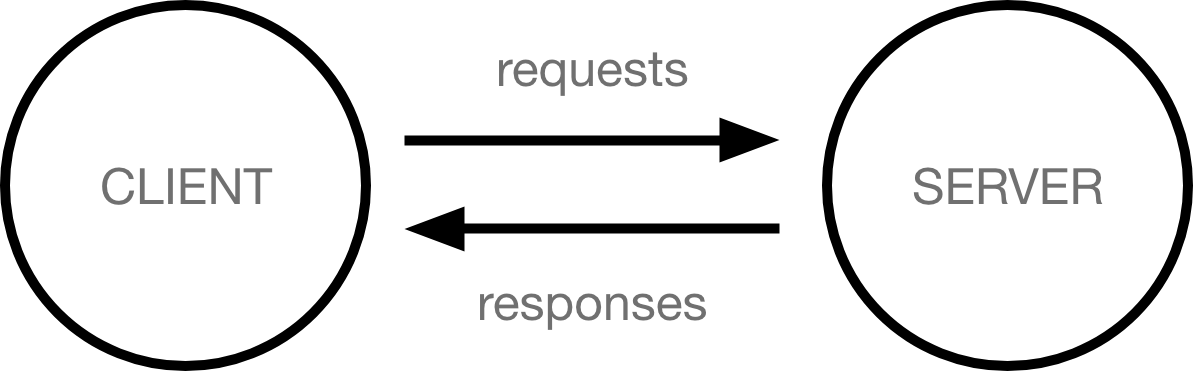
The basic web conversation: the client asks, the server answers. · "How the web works" by Mozilla Contributors, MDN Web Docs, CC BY-SA 2.5 · CC BY-SA
By the end of 1990, one NeXT computer at CERN served the first website and carried a warning not to power it down.[[1]](https://home.cern/science/computing/the-birth-of-the-web/short-history-web/)[[3]](https://commons.wikimedia.org/wiki/File:First_Web_Server.jpg)
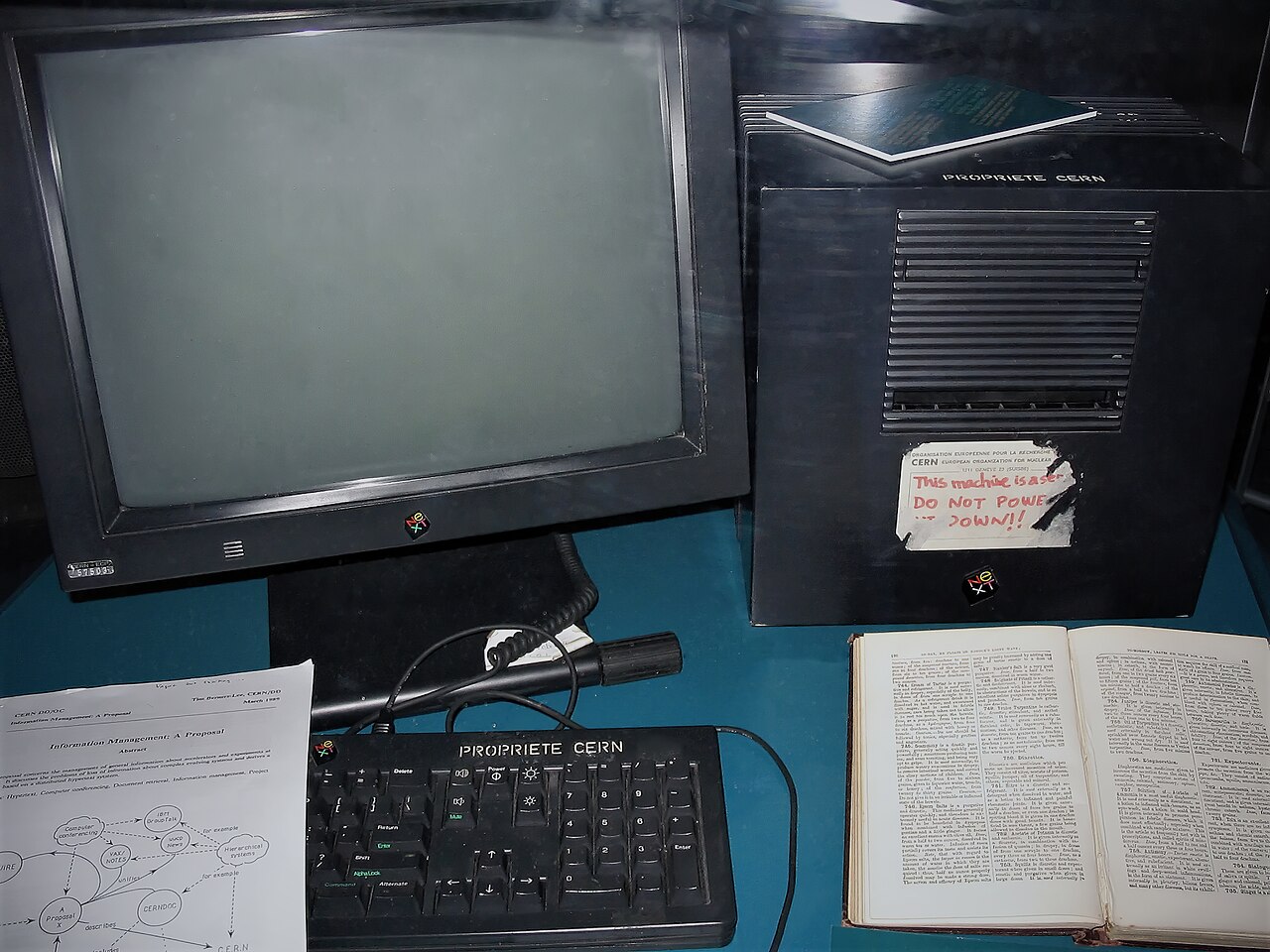
The NeXT computer at CERN that served the first website, still wearing its handwritten "DO NOT POWER IT DOWN!!" label. · Photo by Coolcaesar, Wikimedia Commons, CC BY-SA 3.0 · CC BY-SA

Modern sites may spread that server role across several computers.
- The web was given away
- Friendly browsers spread it
Read the URL
Consider https://developer.mozilla.org/en-US/. A URL tells the browser how and where to ask.[[2]](https://developer.mozilla.org/en-US/docs/Learn_web_development/Getting_started/Web_standards/How_the_web_works)
https is the protocol. developer.mozilla.org is the domain name; developer is a subdomain of mozilla.org. /en-US/ is the path.[[2]](https://developer.mozilla.org/en-US/docs/Learn_web_development/Getting_started/Web_standards/How_the_web_works)
If you omit the protocol, the browser can add HTTPS because nearly every server uses it. Omission alone does not make the visit insecure.[[2]](https://developer.mozilla.org/en-US/docs/Learn_web_development/Getting_started/Web_standards/How_the_web_works)
Shelf Makes a Request
Type shelf.example.com. Before requesting a page, the browser asks DNS and receives the server's IP address.
Next, it sends GET /, an HTTP request, to that address over TCP/IP. HTTP handles the conversation; TCP provides reliable, connection-based transport.[[2]](https://developer.mozilla.org/en-US/docs/Learn_web_development/Getting_started/Web_standards/How_the_web_works)[[4]](https://developer.mozilla.org/en-US/docs/Web/HTTP/Guides/Overview)
The server answers 200 OK and sends the home page's HTML. The browser receives the files and assembles the visible page.[[2]](https://developer.mozilla.org/en-US/docs/Learn_web_development/Getting_started/Web_standards/How_the_web_works)
GET is the HTTP method for asking the server for a copy of something; here, / asks for the home page. 200 OK is a status code meaning the request succeeded. The next lesson covers both and reads the server's reply line by line.
- DNS lookup: The browser asks DNS and receives the server's IP address.
- Send GET /: An HTTP request goes to that address over TCP/IP.
- Server answers: The server replies 200 OK and sends HTML.
- Assemble page: The browser receives the files and builds the visible page.
Pages Travel in Packets
Does a page arrive in one piece? A response is split into packets, each containing a header and payload.[[2]](https://developer.mozilla.org/en-US/docs/Learn_web_development/Getting_started/Web_standards/How_the_web_works)
Packets can take different routes and arrive out of order. TCP reorders them and has only missing packets sent again.[[2]](https://developer.mozilla.org/en-US/docs/Learn_web_development/Getting_started/Web_standards/How_the_web_works)[[4]](https://developer.mozilla.org/en-US/docs/Web/HTTP/Guides/Overview)
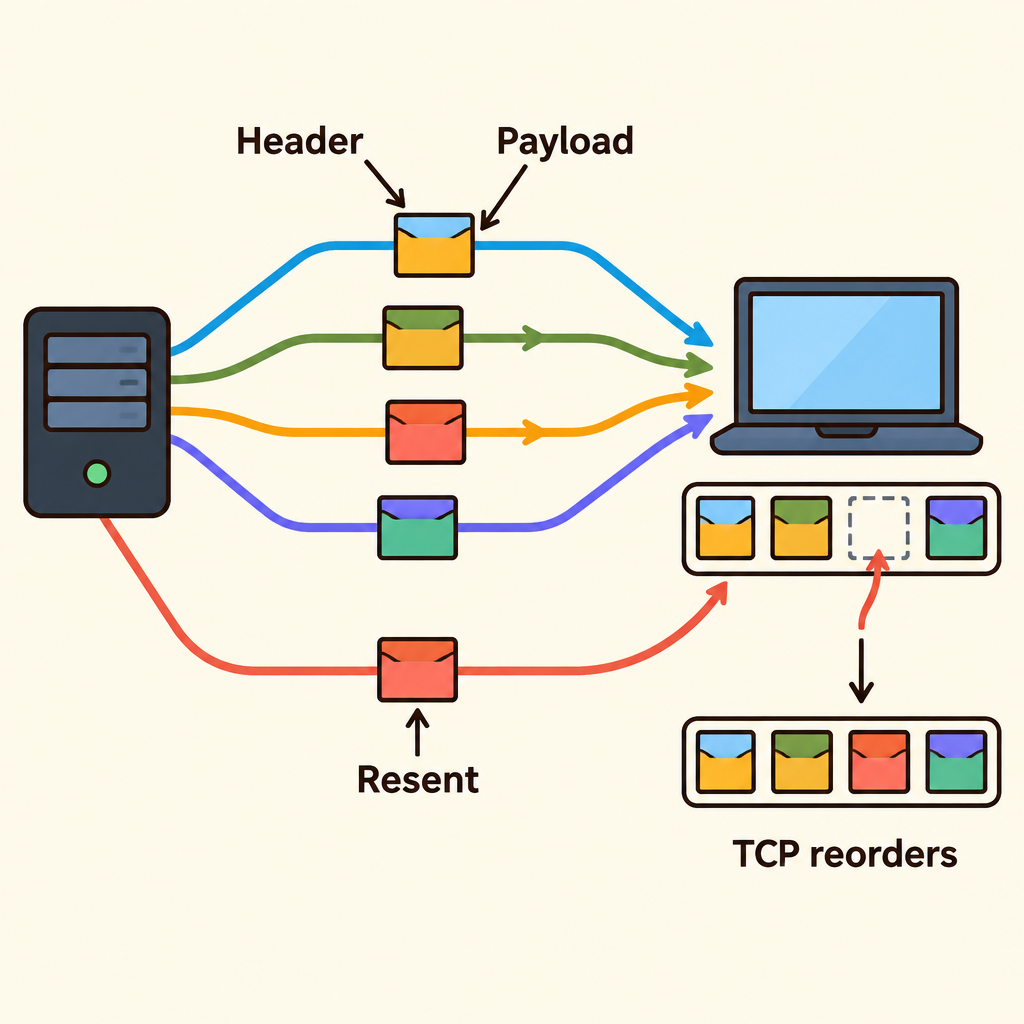
Notice the packets split across different paths and arrive jumbled, yet only the one missing packet is sent again while the rest are reordered.
After TCP restores the data, the browser assembles the HTML and other files. One lost packet therefore does not require reloading the whole page.
Where the Road Analogy Breaks
Can one road explain the web?
Picture your client as a house and the server as a shop. DNS is the address book, TCP/IP is transport, and HTTP is the ordering language.[[2]](https://developer.mozilla.org/en-US/docs/Learn_web_development/Getting_started/Web_standards/How_the_web_works)
The analogy fails at delivery. One van follows one road, but packets for one page may take different routes and arrive out of order.
Use the analogy for roles, then use packets to explain delivery.
Find the Broken Stage
A page stays blank. Where should you look?
Check the chain in order: URL parts, DNS lookup, HTTP request over TCP/IP, server response, packet recovery, then browser assembly and rendering.[[2]](https://developer.mozilla.org/en-US/docs/Learn_web_development/Getting_started/Web_standards/How_the_web_works)[[4]](https://developer.mozilla.org/en-US/docs/Web/HTTP/Guides/Overview)
If DNS fails, the browser never reaches the server. A server failure happens after lookup finds an address.
Other causes include a dropped connection, malformed request, or broken page script. Finding the failed stage narrows the fix.
- Page stays blank
- URL parts correct?
- DNS finds address?
- Server responds?
- Fix URL parts
- DNS failure: The browser never reaches the server.
- Request or server fault: Possible server failure, dropped connection, or malformed request.
- Check assembly, rendering: Look at packet recovery or a broken page script.
- No
- Yes
- No
- Yes
- No
- Yes
Check yourself
A browser can send a web request directly to mozilla.org without first using DNS.
- True
- False
Answer: False
False. DNS translates the domain name into an IP address, which the network uses to reach a server. The domain name is a lookup key, not the server's network address.
When loading a page, the browser performs _____ first, sends a _____ next, receives a _____ after that, and completes with _____.
Answer: When loading a page, the browser performs DNS lookup first, sends a GET request next, receives a server response after that, and completes with page assembly.
The browser first gets an IP address from DNS. It then sends an HTTP request, receives files from the server, and assembles those files into the visible page.
In https://developer.mozilla.org/en-US/, which description correctly identifies the URL parts?
- https = protocol; developer.mozilla.org = domain; developer = subdomain; /en-US/ = path
- https = domain; developer.mozilla.org = path; developer = protocol; /en-US/ = subdomain
- https = path; developer.mozilla.org = subdomain; developer = domain; /en-US/ = protocol
- https = subdomain; developer.mozilla.org = protocol; developer = path; /en-US/ = domain
Answer: https = protocol; developer.mozilla.org = domain; developer = subdomain; /en-US/ = path
https specifies how to communicate, developer.mozilla.org is the domain name, developer is its subdomain, and /en-US/ identifies the requested path.
Keep going
This is lesson 1 of 10 in Web Development: From Basics to Full-Stack. Next up:
- Requests, Responses, and Status Codes
- HTML Gives Meaning, CSS Gives Looks
- How JavaScript Changes a Live Page
- Why Frameworks Think in Components
- Starting an App with Next.js or Vite
Wondering turns any topic into short lessons you can read, watch, or listen to, with practice questions and an AI tutor.