Free sample lesson · Tuning Fireworks for Customer Workloads
Request Path
What happens to a customer's prompt between the HTTP call and the first token that streams back?
Lesson 1 of the Wondering course Tuning Fireworks for Customer Workloads
From HTTP Call to First Token
You already know the API side: send a prompt, get tokens back. This lesson opens up what happens in between.
A Fireworks deployment is a web server wrapped around one or more GPUs. You start it with one command, and nearly every setting is a flag on that command.
Every request travels through four stages, always in the same order.
- HTTP layer: A FastAPI server and the coordinator receive the request.
- Tokenization: CPU workers turn the text into integer tokens.
- Prefill: The GPU reads the whole prompt in one go.
- Generation: The GPU writes the answer one token at a time.
Once you know the order, you can point at the stage behind a customer's delay.
The Front Door: HTTP and Coordinator
Stage one is the HTTP layer. A FastAPI server exposes OpenAI-compatible endpoints for completions, chat, and embeddings.
That is why familiar OpenAI-style client calls work here.
The server hands each request to a coordinator. The coordinator sends work to the GPU workers asynchronously.
When the answer is ready, the coordinator either streams it back as tokens arrive or returns it whole.
- Endpoints
- Completions
- Chat
- Embeddings
- Coordinator jobs
- Sends work to GPU workers: Done asynchronously, so requests do not wait in line at the front door.
- Streams the answer back
- Or returns it whole
Tokenization Runs on the CPU
Models do not read raw text. They read tokens, integers that stand for pieces of text.
Stage two turns your prompt into tokens. It runs on the CPU in a pool of background processes set by --num-tokenizer-workers, default 8.
The same pool works on the way out, turning generated tokens back into text.
Remember this split: only prefill and generation use the GPUs. Tokenizing and chat formatting stay on CPU workers.
- CPU workers
- GPUs
Prefill: The Reading Phase
Stage three is prefill, the first stage that touches the GPU.
The GPU reads the whole prompt in one go. It does not step through the prompt word by word.
As it reads, it records what it learned about every token in the KV cache, which lives in GPU memory.
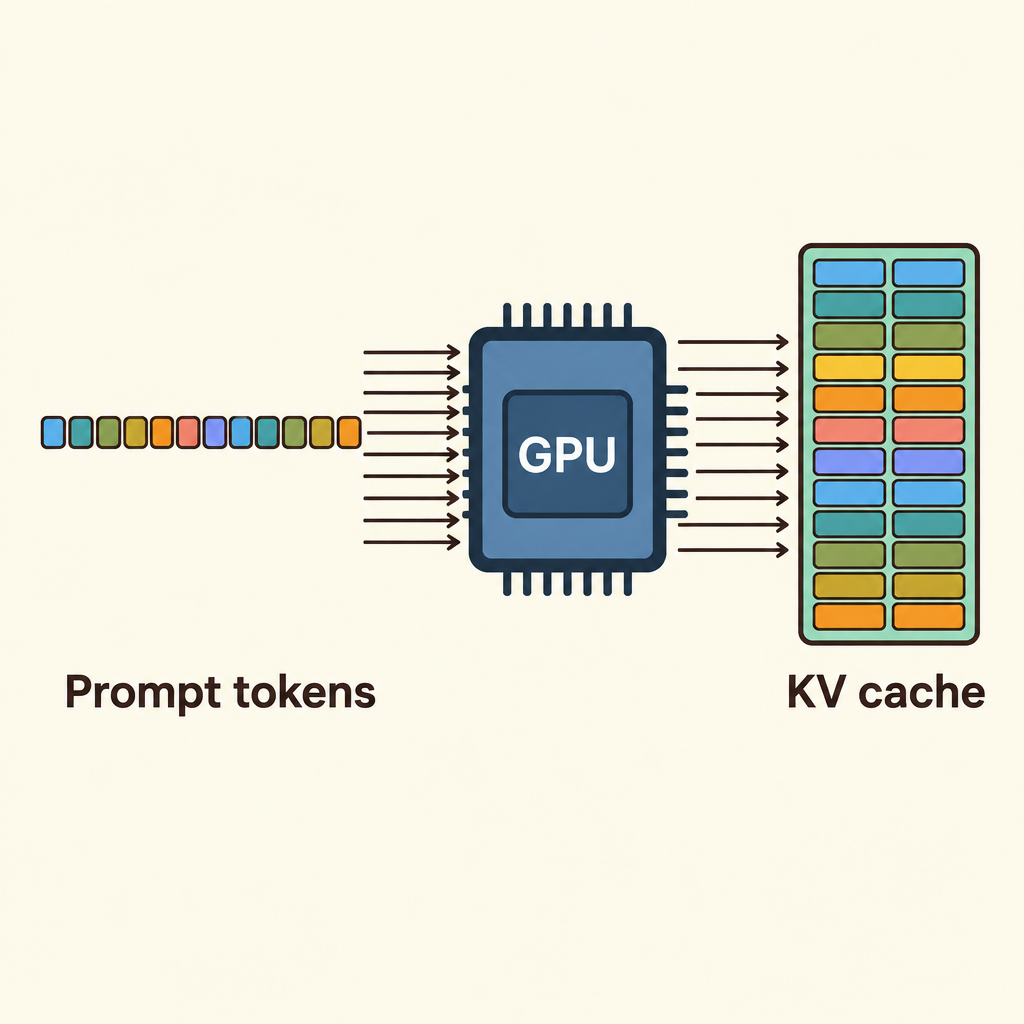
Notice that all prompt tokens enter the GPU side by side at the same moment, and what the GPU learns about each one is stored in the KV cache.
Generation depends on this cache, so nothing streams back until prefill finishes.
Generation: One Token at a Time
Stage four is generation, also called decode.
The GPU produces the answer one token at a time. Each step reuses the KV cache instead of rereading the whole prompt.
- Reuse KV cache: The GPU draws on what prefill recorded.
- Produce one token: Many requests do this together in a continuous batch.
- Stream token back: CPU workers turn it into text for the client.
Many requests are decoded together in a continuous batch, so the GPU works on several requests in the same loop.
The loop is replayed with CUDA graphs to cut CPU overhead. Each token streams back and is turned into text on the CPU.
Tracing a Sluggish Response
Imagine a support-chat customer says responses "feel sluggish" on a 70B-class model. Prompts are about 2K tokens, and answers are about 300 tokens.
First, the coordinator hands the request to one of the 8 CPU tokenizer workers.
Then prefill reads all 2K prompt tokens on the GPU in one pass and fills the KV cache. After that, generation produces the 300 answer tokens one at a time.
Long pause before the first word, and latency_prefill_queue_ms is high? Prefill is backed up, so add prefill capacity.
First word arrives quickly but the stream is choppy? Generation is the problem, so compare latency_generation_per_token_ms with generator_num_active.
- Feels sluggish
- Long first-word pause?
- Prefill queue high?: Check latency_prefill_queue_ms.
- Add prefill capacity
- Choppy stream?
- Check generation metrics: Compare latency_generation_per_token_ms with generator_num_active.
- Yes
- No
- Yes
- Yes
Map Each Stage to Code
Each stage maps to a file with a fairly obvious name.
fastapi_app.py and coordinator.py run the front end. tokenizer_worker.py handles tokenization.
prefill_worker.py and generator_worker.py do the GPU work. args.py holds flag defaults, and factory.py wires it together.
Your habit: name the stage first, then open its file or check its metric.
Check yourself
In a Fireworks deployment, turning prompt text into tokens and formatting chat messages happens on _____
- CPU worker processes
- the GPUs
Answer: CPU worker processes
Tokenizing and chat formatting run in a pool of background CPU processes (--num-tokenizer-workers, default 8). Only prefill and generation run on the GPUs.
The GPU reads the whole prompt in a single pass during _____ and stores what it learned about each token in the _____. Then _____ produces the answer one token at a time.
Answer: The GPU reads the whole prompt in a single pass during prefill and stores what it learned about each token in the KV cache. Then generation produces the answer one token at a time.
Prefill is the reading phase: one pass over the full prompt that fills the KV cache. Generation (decode) is the writing phase: it outputs one token at a time and reuses that cache.
A code-assistant team complains that after they hit send, they wait a long time before the first word appears. Your dashboard shows latency_prefill_queue_ms is high. Which stage is backed up, and what should you do?
- Prefill is backed up, so add prefill capacity
- Generation is backed up, so add generation capacity
- Tokenization is backed up, so add tokenizer workers
- The HTTP layer is backed up, so add web servers
Answer: Prefill is backed up, so add prefill capacity
A long pause before the first word plus a high latency_prefill_queue_ms means requests are waiting to be prefilled, so the fix is to add prefill capacity. Generation problems show up as a choppy stream after the first word arrives, not as a long wait before it.
Keep going
This is lesson 1 of 14 in Tuning Fireworks for Customer Workloads. Next up:
- Prefill vs Decode
- Three Metrics
- Batching Knobs
- Sharding
- Disaggregation
Wondering turns any topic into short lessons you can read, watch, or listen to, with practice questions and an AI tutor.