Free sample lesson · System Design Interview
Server-Database Separation
What happens when your startup's all-in-one server can't keep up with success?
Lesson 1 of the Wondering course System Design Interview
Starting With One Server
Picture a new startup. To launch fast, the team puts everything on one server.
The web app, the database, and the cache all live on the same machine. They share its processor, memory, and disk.
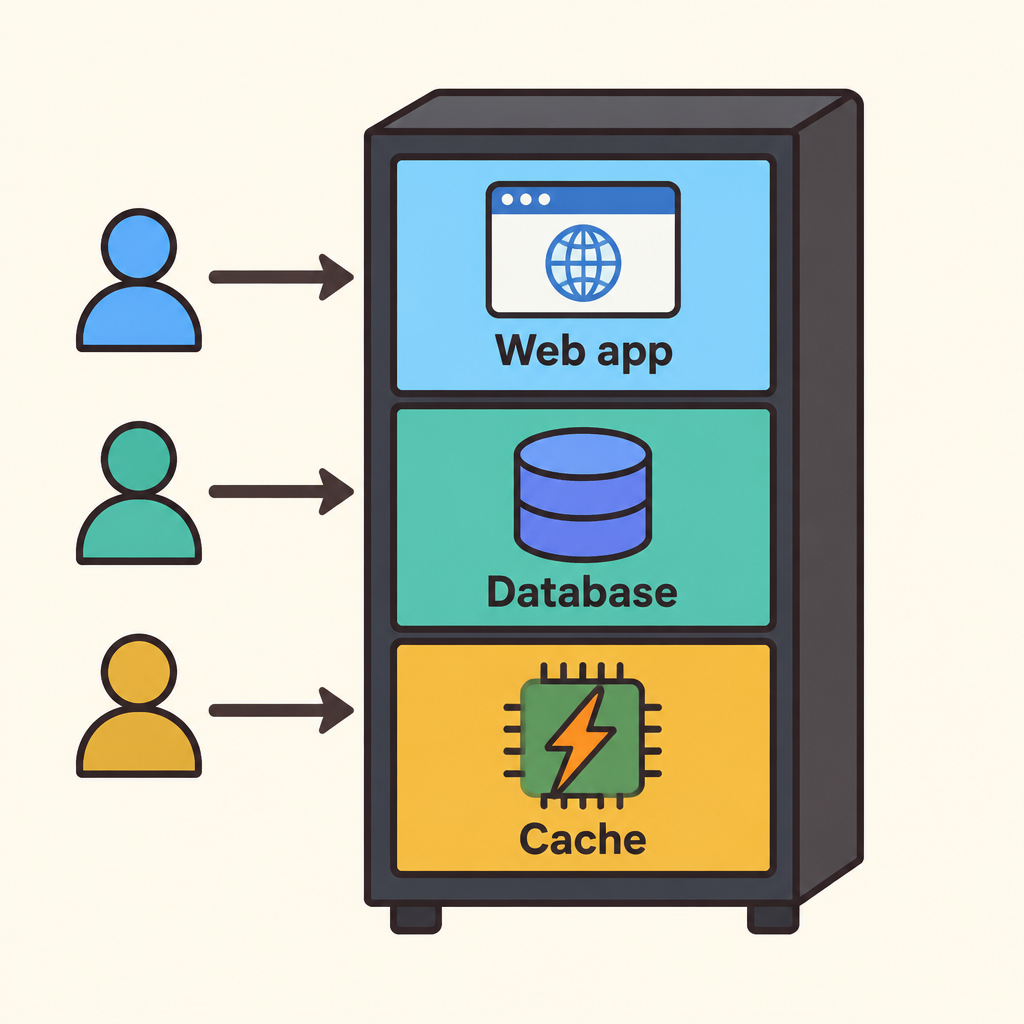
Notice that all three parts sit inside the same box, so they draw on the same limited machine.
This is called a single server setup. It is simple to build and easy to manage.
Then success arrives, and more users show up every day.
What That One Server Does
In a single server setup, one machine handles every part of a user's visit.
- DNS resolution: The web address is turned into the server's address.
- HTTP request: The browser sends its request to the server.
- Data operations: The web app reads and writes data on the same machine.
- Response: The server sends the result back to the user.
First, DNS resolution turns a web address into the server's address. Then the browser sends an HTTP request to that server.
The web app processes the request and runs data operations, reading and writing records in the database on the same machine.
Finally, the server sends the response back. Every step happens in one place.
Why One Machine Hits a Wall
A single server is limited by single-machine capacity. It only has so much processor power, memory, and storage.
As traffic grows, the web app and the database compete for those same resources.
A busy database can slow down page responses. A flood of web requests can slow down data operations.
You cannot grow one part without growing the whole box.
The First Big Move
The first major scaling step is database separation: moving the database onto its own server.
Now the web app runs on one machine and the database runs on another. The web app connects to the database over the network.
- Single server
- Separated database
Each server can focus on one job instead of sharing resources.
Engineers call this separating concerns.
Two Tiers, Scaled Independently
After separation, you have two tiers.
The web tier handles compute: running the app and answering HTTP requests. The data tier handles storage: keeping and serving the data.
- Web tier
- Data tier
Because they live on different servers, you can scale each one independently.
If the app needs more processing power, upgrade the web tier. If the data grows, upgrade the data tier.
Spotting the Moment to Split
Look for this pattern in your own systems: one server running everything, with performance dropping as users grow.
If the web app and database are fighting over one machine's capacity, separating the database is the natural first step.
- One server runs everything
- Server at capacity?: Are the web app and database fighting over one machine?
- Keep simple setup: Simplicity has real value early on.
- Move database out: Put the database on its own server.
- Scale tiers independently: Grow compute and storage separately.
- No
- Yes
If one server still handles the load comfortably, keep the simple setup. Simplicity has real value early on.
To explain it to a colleague: split compute from storage so each can grow on its own.
Check yourself
In a typical starting architecture, the web app, database, and cache all run on _____.
- a single server
- separate servers
Answer: a single server
Systems usually start with everything on one server. That one machine handles HTTP requests, data operations, and caching. The setup is simple to run, but it is limited by what one machine can do.
After database separation, the _____ handles compute work like HTTP requests, while the _____ handles storage.
Answer: After database separation, the web tier handles compute work like HTTP requests, while the data tier handles storage.
Separation creates two tiers. The web tier runs the application and processes requests, which is compute work. The data tier stores and serves data.
Why does a single server setup eventually stop working well as traffic grows?
- All components compete for one machine's limited capacity
- Single servers are too complex to configure and maintain
- DNS resolution cannot work with only one server
- Databases cannot store data on the same machine as an app
Answer: All components compete for one machine's limited capacity
In a single server setup, every component shares one machine's resources. As load grows, the system hits the capacity limit of that single machine. The other options are not the core limitation: a single server is actually simple to run, and DNS works no matter how many servers you have.
Keep going
This is lesson 1 of 35 in System Design Interview. Next up:
- Load Balancers & Stateless
- Caching & CDNs
- Power of Two
- Latency & Storage
- Clarify Requirements
Wondering turns any topic into short lessons you can read, watch, or listen to, with practice questions and an AI tutor.