Free sample lesson · Sharding vs. Partitioning: When to Use Each
How partitioning splits a table within a single database instance
Lesson 1 of the Wondering course Sharding vs. Partitioning: When to Use Each
One Table, Many Pieces
A single table can grow until every query has to scan millions of rows.
Partitioning splits that one logical table into smaller physical pieces called partitions.
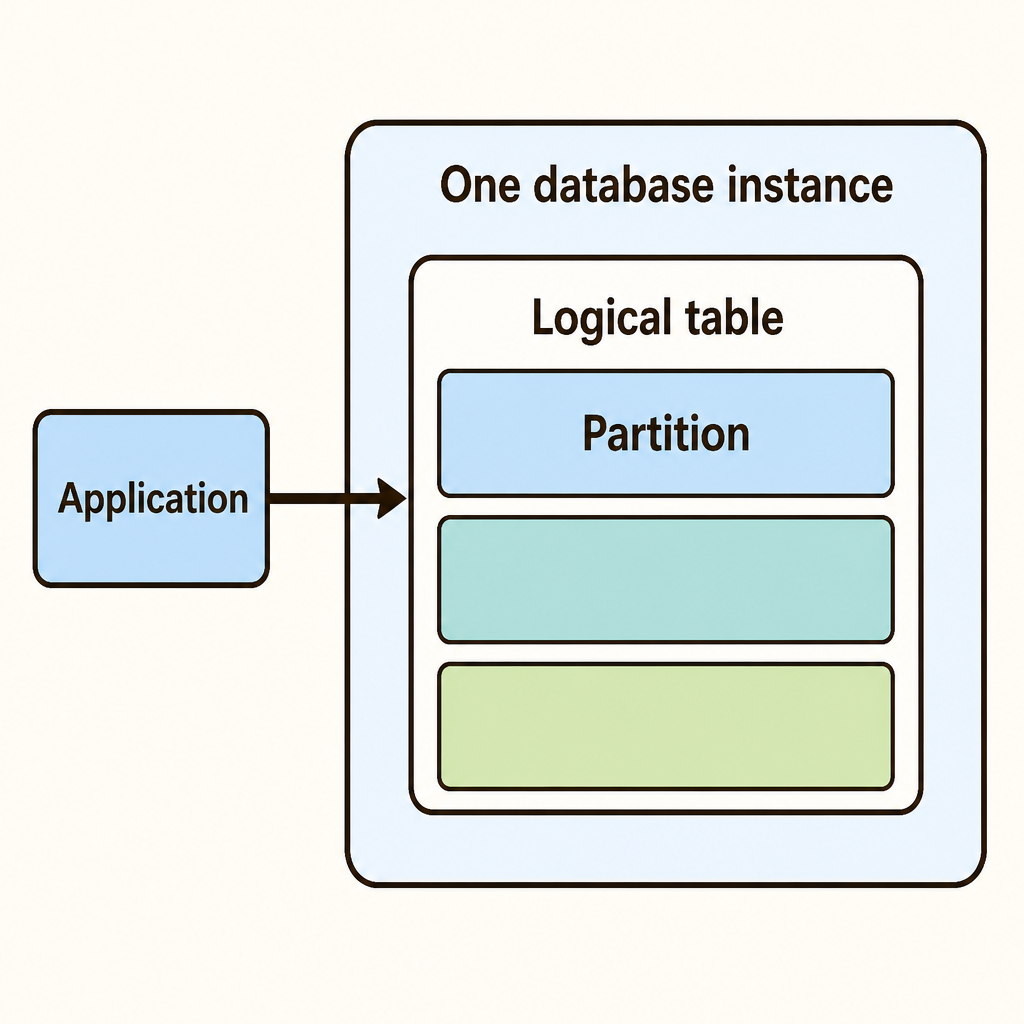
Notice that the three partitions sit inside one instance boundary while the application still points at a single table name.
All the pieces still live inside the same database instance. The application keeps querying one table name.
The database engine decides which partition to touch.
Partitioning Is Not Sharding
These two ideas are easy to confuse.
Partitioning keeps every piece on one machine, one instance. Sharding spreads pieces across separate database servers.
- Partitioning
- Sharding
So partitioning does not add more CPU or more memory. It reorganizes storage so the engine reads less.
Same hardware, smaller reads.
Choosing A Partition Key
Every partitioned table needs a partition key: the column the engine uses to decide where a row belongs.
An orders table might use created_at. A customers table might use region.
The key should match how you query. If most queries filter by date, partitioning by region helps nobody.
- Read queries: Look at which columns appear in your WHERE clauses.
- Pick column: Choose the column that filters most of your reads.
- Check spread: Confirm rows spread across partitions instead of piling into one.
- Define ranges: Assign each partition the range or value it will hold.
Pick the column that appears in your WHERE clause.
Range, List, And Hash
There are three common ways to map a key to a partition.
Range splits by intervals, such as one partition per month. List splits by named values, such as one partition per region.
Hash runs the key through a hash function to spread rows evenly when no natural grouping exists.
- Range
- List
- Hash
Range suits time-series data. Hash suits high-cardinality keys like user IDs.
How Partition Pruning Works
The real payoff is partition pruning.
When a query filters on the partition key, the planner skips partitions that cannot contain matching rows.
A query for last month's orders reads one monthly partition instead of every row in the table.
- Query arrives
- Filters partition key?
- Skip partitions: Planner drops partitions that cannot contain matching rows.
- Scan all partitions: Without the key the engine reads every partition.
- Return rows
But if the query omits the partition key, the engine scans all partitions. Pruning disappears.
Maintenance Gets Easier
Partitioning also changes how you manage old data.
Deleting a year of rows from a huge table is slow and bloats the table. Dropping a partition removes that data almost instantly.
The same applies to adding data: create next month's partition before the rows arrive.
- Create partition: Add next month's partition before the rows arrive.
- Load rows: New rows route into the current partition.
- Index and vacuum: Maintenance runs on a smaller partition rather than the whole table.
- Drop old partition: Removing aged data is almost instant instead of a slow delete.
Indexes and vacuum work also shrink, because each partition is smaller.
When It Is Worth It
Partitioning is not free. It adds schema complexity and a key you must design around.
Small tables gain nothing. The engine already handles them with a plain index.
It pays off when the table is very large, queries filter on the key, and old data is dropped in bulk.
If your queries rarely mention the partition key, reconsider the design.
Check yourself
Partitioning keeps all table partitions within one database instance rather than spreading them across separate database servers.
- True
- False
Answer: True
This statement is correct. Partitioning reorganizes storage on the same machine and instance; sharding distributes pieces across separate database servers.
Partitioning methods use different mapping clues: _____ assigns intervals such as months, _____ assigns named values such as regions, and _____ distributes keys using a hash function.
Answer: Partitioning methods use different mapping clues: Range assigns intervals such as months, List assigns named values such as regions, and Hash distributes keys using a hash function.
Range partitioning uses intervals, list partitioning uses explicitly named values, and hash partitioning uses a hash function to spread rows. Each description uniquely identifies one method.
An orders table is very large, and most queries filter by created_at. Which partition key is the strongest choice?
created_at- The order's total amount
- The customer's email address
- A randomly generated description
Answer: created_at
created_at is the strongest choice because the partition key should match a column commonly used in query filters. This alignment enables partition pruning.
Keep going
This is lesson 1 of 9 in Sharding vs. Partitioning: When to Use Each. Next up:
- Time-based partitioning and why DROP PARTITION beats DELETE
- When a single instance is still enough
- How sharding distributes data across separate machines
- Shard keys and query routing, using Vitess as a real example
- Why sharding solves a different problem than partitioning
Wondering turns any topic into short lessons you can read, watch, or listen to, with practice questions and an AI tutor.