Free sample lesson · HCI 101
Discoverability
Why do simple doors require signs telling us to push or pull?
Lesson 1 of the Wondering course HCI 101
The Door That Needs a Sign
You walk up to a glass door. You push. Nothing happens.
A small sign says Pull.

Disabledandhere-043-cafedoor · Chona Kasinger for Disabled And Here · CC BY 4.0 · Wikimedia Commons
That sign is a confession. The door could not explain itself, so someone taped words onto it.
Norman said it plainly: a device as simple as a door that needs a sign is a failure, poorly designed.
What Discoverability Means
Discoverability is the ability to figure out what actions are possible, and where and how to perform them.
No manual. No trial and error. No asking the person behind you.
- What: Determine what actions are possible with this object.
- Where: Locate the exact place where the action is performed.
- How: Know how to perform the action without instructions.
When you approach an object, its form should answer three quiet questions: what can I do here, where do I do it, and how?
What Understanding Means
Discoverability gets you started. Understanding keeps you going.
Understanding means comprehending what a product does, how it works, and what results will occur from your actions.
You press the button expecting one thing. Understanding is when the product actually does that thing.
- Discoverability
- Understanding
Both qualities together form the foundation of usable design.
How a Good Door Signals
A well-designed door needs no words at all.
A flat plate signals pushing. You cannot grab a flat plate, so pushing is the only option left to you.
A handle signals pulling. It invites grasping.
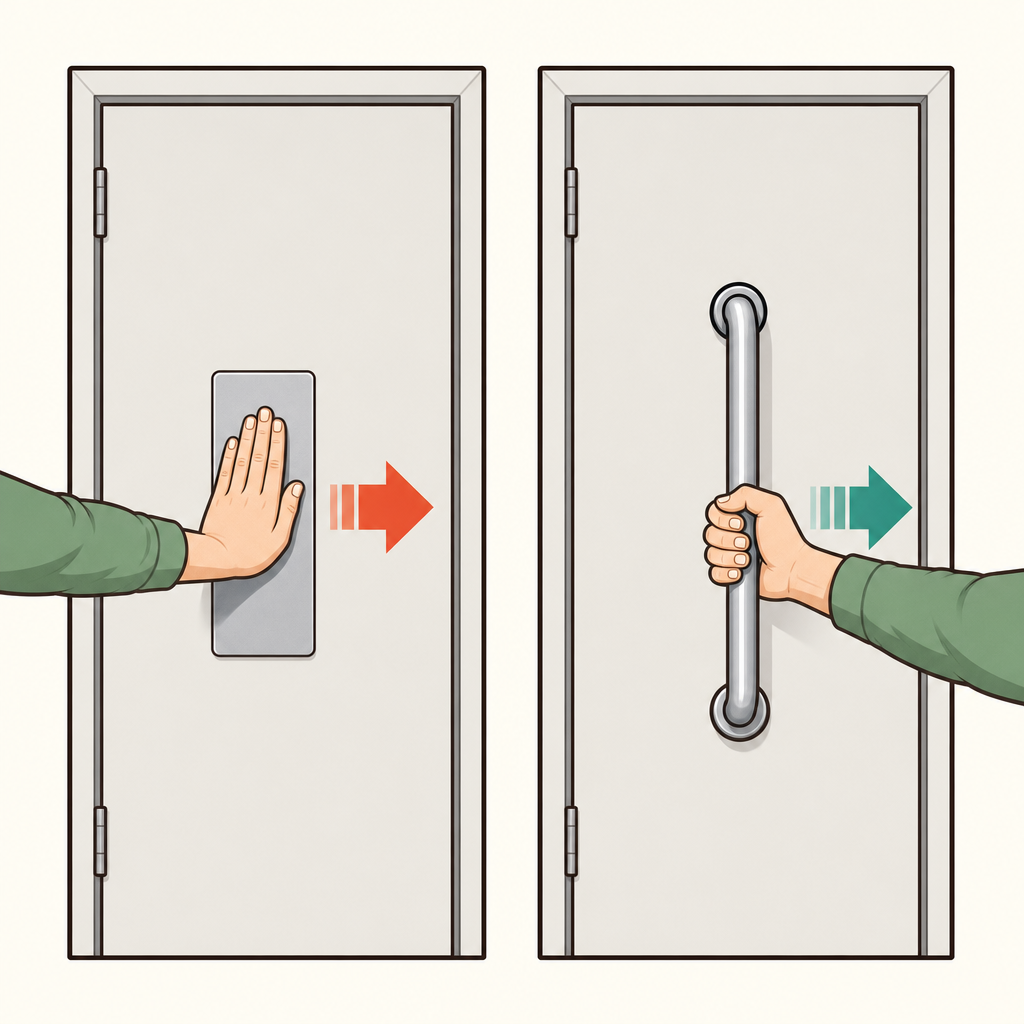
Notice that the flat plate offers nothing to grip while the handle invites a hand to wrap around it, so each shape names its own action.
The shape does the talking. That is discoverability built into the material itself.
Users Blame Themselves
Here is the strange part. When products lack discoverability and understanding, users struggle and then blame themselves.
They say I am bad with technology instead of this was built badly.
The failure was never theirs. The design failed to communicate.
Every added sign, sticker, or instruction is evidence of a design that could not speak for itself.
Reading Objects Around You
You can now test any object you meet.
Ask whether its form tells you what is possible, where to act, and how. Then ask whether the result matches what you expected.
If the answer requires a sign, the design is doing the work that shape should have done.
Start with the doors you walk through today.
Check yourself
Which quality lets a person determine what actions are possible and how to perform them without instructions?
- Discoverability
- Understanding
Answer: Discoverability
Discoverability helps people identify possible actions, where to act, and how to act without a manual or trial and error. Understanding concerns what the product does and what results actions will produce.
A door’s _____ signals pushing, while its _____ signals pulling.
Answer: A door’s flat plate signals pushing, while its handle signals pulling.
A flat plate cannot easily be grasped, so it suggests pushing. A handle invites grasping, so it suggests pulling. The door’s form communicates the action without words.
Which door design best communicates “push” without words?
- A door with a flat plate
- A door with a pull sign
- A door beside an instruction manual
- A door with a large warning sticker
Answer: A door with a flat plate
A flat plate signals pushing because it cannot be easily grasped. A handle signals pulling, while a sign or manual adds instructions because the form does not communicate clearly by itself.
Keep going
This is lesson 1 of 25 in HCI 101. Next up:
- Affordances
- Signifiers
- Mapping
- Feedback
- Conceptual Models
Wondering turns any topic into short lessons you can read, watch, or listen to, with practice questions and an AI tutor.