Free sample lesson · Everyday Design Fundamentals
Discoverability
Why do simple doors require signs telling us to push or pull?
Lesson 1 of the Wondering course Everyday Design Fundamentals
The Sign Is the Bug Report
A door with a Push sign is a defect report written by the user.
Norman states: "When a device as simple as a door has to have a sign to tell you whether to pull, push, or slide, then it is a failure, poorly designed."

Signs-1160236, Dingle Peninsula, Co. Kerry, Ireland · Mucklagh · CC BY 4.0 · Wikimedia Commons
The same logic applies to your interfaces. Every tooltip explaining a basic control is a small confession.
Discoverability: What Can I Do?
Discoverability is the ability to figure out what actions are possible and where and how to perform them.
No instructions. No extensive exploration.
- Discoverability
- Understanding
In an interface, this is the question a user answers in the first second: which things here are controls, and how do I operate them?
Understanding: What Will Happen?
Understanding means comprehending what a product does, how it works, and what results will occur from our actions.
Discoverability gets the user to act. Understanding tells them what that act will cause.
- What results occur: The user can predict the outcome of an action before taking it.
- How it works: The user holds a workable idea of the mechanism behind the control.
- What it does: The user grasps the purpose of the product at all.
Each level rests on the one below
A control can be perfectly visible and still fail here, if the outcome it produces is a surprise.
The Door That Needs No Sign
A well-designed door signals its own operation.
A flat plate signals pushing. You cannot grab it, so you must push.
A handle signals pulling. It invites grasping.
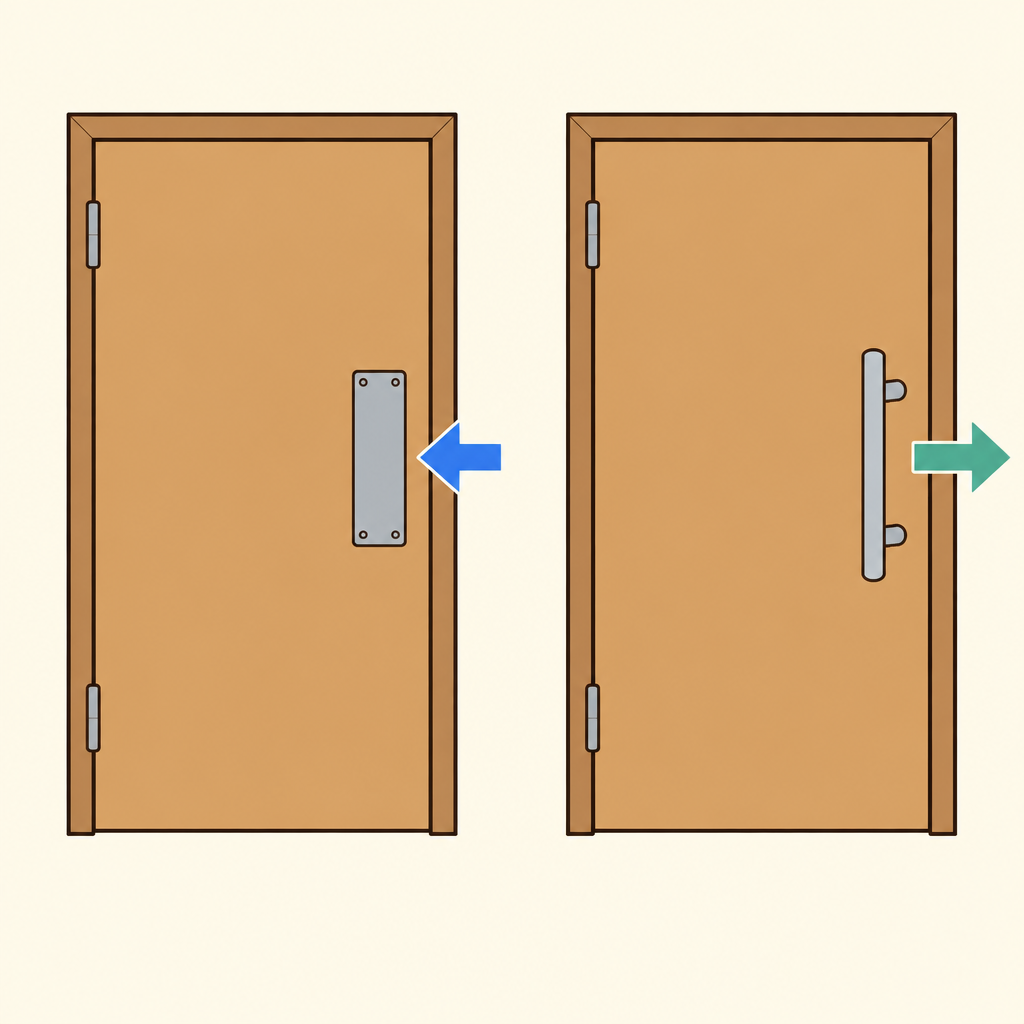
Notice that the plate offers nothing to grip while the handle offers a bar to grasp, so each shape carries its own instruction.
The hardware carries the instruction, so no sign is required.
Applying It To Interfaces
When users struggle, the design has failed, not the user.
Yet users usually blame themselves. That silence hides your defects.
So audit your work: can a first-time user find the action, and predict its result, without help text?
Check yourself
A user can see a button but cannot tell what action it performs. Does this primarily indicate a discoverability problem?
- Yes
- No
Answer: Yes
Yes. Discoverability concerns whether users can determine what actions are possible and where and how to perform them. The button may be visible, but its possible action is unclear.
In interface design, _____ helps a user find an available action, while _____ helps the user predict its result.
Answer: In interface design, discoverability helps a user find an available action, while understanding helps the user predict its result.
Discoverability answers, “What can I do, and where do I do it?” Understanding answers, “What will happen when I do it?” A control can be easy to find but still produce a surprising result.
A mobile app shows a prominent “Archive” icon, so users can find it easily. After tapping it, messages disappear and users do not know where they went. Which assessment is most accurate?
- Good discoverability and poor understanding
- Poor discoverability and good understanding
- Poor discoverability and poor understanding
- Good discoverability and good understanding
Answer: Good discoverability and poor understanding
The control has good discoverability because users can find it. It has poor understanding because the result is surprising or unclear. Discoverability gets users to act; understanding helps them predict the consequence.
Keep going
This is lesson 1 of 25 in Everyday Design Fundamentals. Next up:
- Affordances
- Signifiers
- Mapping
- Feedback
- Conceptual Models
Wondering turns any topic into short lessons you can read, watch, or listen to, with practice questions and an AI tutor.