Free sample lesson · Design a New Feature with AI
Brief the Agent with Real Context
Why does 'design a meal planner' get you a generic app?
Lesson 1 of the Wondering course Design a New Feature with AI
Why Your Planner Looks Generic
Type "design a weekly meal planner" into an AI tool and you get a stock calendar grid. It works. It also looks like every other app.
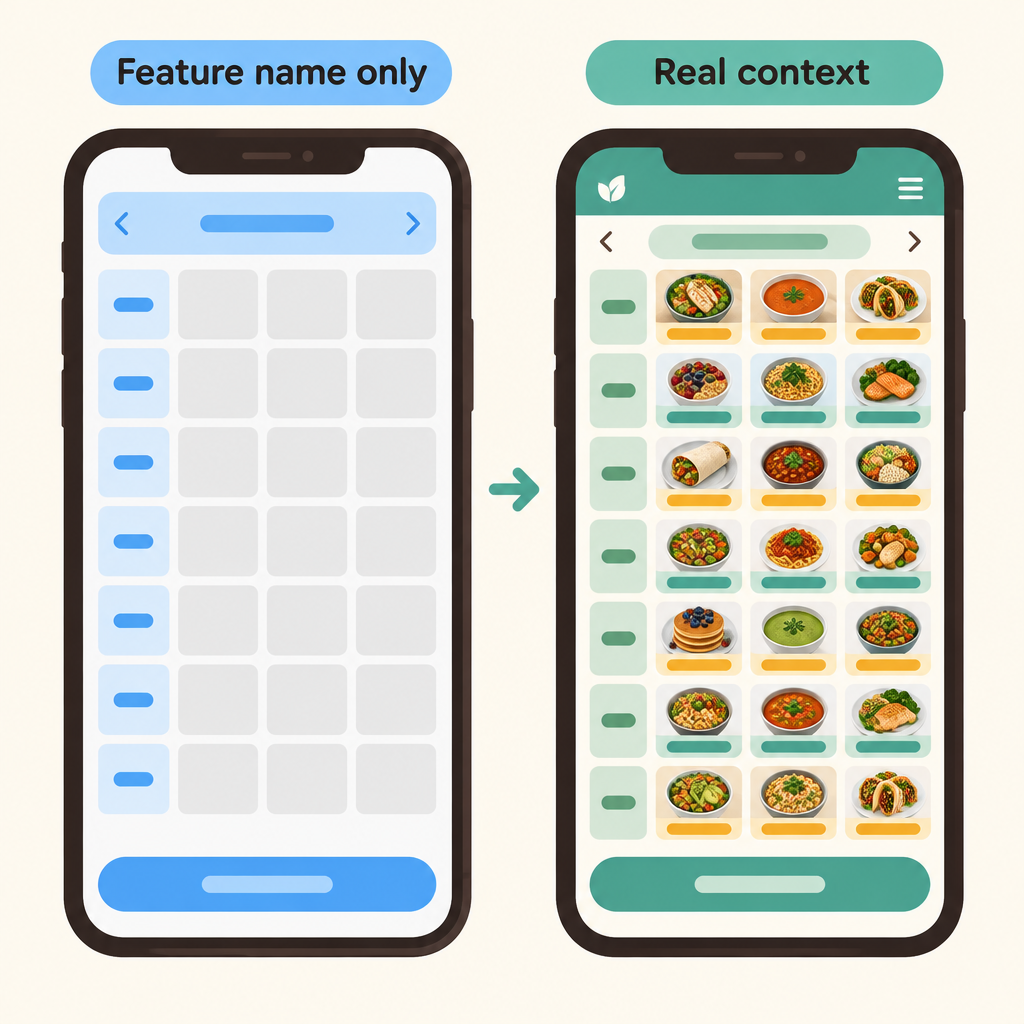
Notice that the left screen could belong to any app, while the right one reuses the product's own recipe cards and style, which is what real context makes possible.
The agent did its job. It filled every gap you left with the most common answer it knows.
A feature name tells the agent what to build. It says nothing about your product, your components, or what success means for your users.
This lesson shows how to brief an agent so its work fits your product instead of a template.
Three Kinds of Context
- Feature context
- The app: The existing product to fit, like Simmer's screens.
- Design system: Shared colors, type, and components, like Simmer's tokens.
- Goals: What the feature must achieve.
- Fits the app
- Under three decisions
- Visibly filled
An agent designing a feature needs three kinds of context. A feature name alone supplies none of them.
The app is the existing product the feature must fit, like Simmer's real screens.
The design system is the shared colors, type, and components it must respect, like Simmer's tokens.
The goals are what the feature must achieve. For Simmer's planner: it fits the app, takes under three decisions to start, and is visibly filled after setup.
Each Gap Leaves a Mark
Each missing piece produces a predictable kind of generic output. You can read the symptom back to the gap.
No app? The agent invents a generic UI that could belong to any product.
No system? It invents new colors and components that clash with yours.
No goals? It optimizes for looking finished rather than for solving the problem.
A clever prompt cannot fill these gaps. Better wording cannot supply files or goals the agent never saw.
Setup Is the Real Work
The quality of an agent's design work rises and falls with the setup you give it.
An agentic tool, such as Claude Code or Cursor, is one you talk to in plain language while it reads and edits your files.
- Gather screens: Put the existing app screens, like Simmer's, in one folder.
- Add tokens: Include the design system's token file in that folder.
- State goals: Write what the feature must achieve, such as under three decisions to start.
- Point the tool: Aim the agentic tool at the folder so it reuses real components.
Point it at the folder with Simmer's screens and token file. Now it can reuse the real recipe card and buttons instead of inventing new ones.
That makes assembling the right files and goals the highest-leverage part of the task.
Re-prompt or Fix the Context?
When a result is weak, many designers regenerate or switch models. Often the model was never the problem.
- Weak result
- App, system, goals given?
- Add missing context: Add the files or state the goal the brief lacked.
- Re-prompt the issue: Name the specific problem you see.
- Run it again
- Review the result
- Still weak
Ask first: did the brief give the agent the app, the system, and the goals?
If not, fix the setup. Add the missing files or state the goal, then run it again.
If all three were there, a focused re-prompt about the specific issue makes sense.
More Is Not Always Better
Once you see the value of context, it is tempting to paste in everything you have.
Resist that. Unrelated documents can bury the goals you care about.
The aim is the relevant app, system, and goals, stated clearly.
Documents that have nothing to do with the meal planner only give the agent more noise to sort through.
Rewrite a Weak Brief
A good brief names the user problem, the success criteria, and the files to work from.
Weak: Make a meal planner for a recipe app.
- Weak brief
- Strong brief
Strong: Using the Simmer screens and tokens in this folder, design a weekly meal planner. Goals: it fits the app, a new user can start with under three decisions, and their planner visibly fills with recipes they saved.
Before you hit enter, check your brief for app, system, and goals.
Check yourself
A feature name alone gives an agent the existing app, the design system, and the feature goals.
- True
- False
Answer: False
False. A feature name says what to build, but it does not provide the product, shared styles and components, or success criteria.
Before prompting an agentic tool, gather the existing app _____, add the design system's _____, state the feature _____, and point the tool at the folder.
Answer: Before prompting an agentic tool, gather the existing app screens, add the design system's tokens, state the feature goals, and point the tool at the folder.
A strong setup includes real product screens, design tokens, explicit goals, and a folder the tool can read. This lets the agent reuse the product's actual components.
An AI-generated planner looks polished but does not help users start quickly or see recipes filled in. Which missing context most directly explains this result?
- The app's existing screens
- The design system's tokens
- The feature's success goals
- The tool's model version
Answer: The feature's success goals
Missing goals cause the agent to optimize for looking finished instead of achieving outcomes such as starting in under three decisions and visibly filling the planner.
Keep going
This is lesson 1 of 4 in Design a New Feature with AI. Next up:
- Design Inside an Existing System
- Diverge on Timing, Placement, Interaction
- Critique Against the Goals
Wondering turns any topic into short lessons you can read, watch, or listen to, with practice questions and an AI tutor.