Free sample lesson · Containers and OpenShift for Marketers
Container Basics
Why did lightweight digital containers revolutionize modern software delivery?
Lesson 1 of the Wondering course Containers and OpenShift for Marketers
The Packaging Problem
Software rarely fails because the code is wrong. It often fails because the surroundings changed.
An application needs supporting libraries, settings, and runtime components to operate. Move the code without them, and things break.
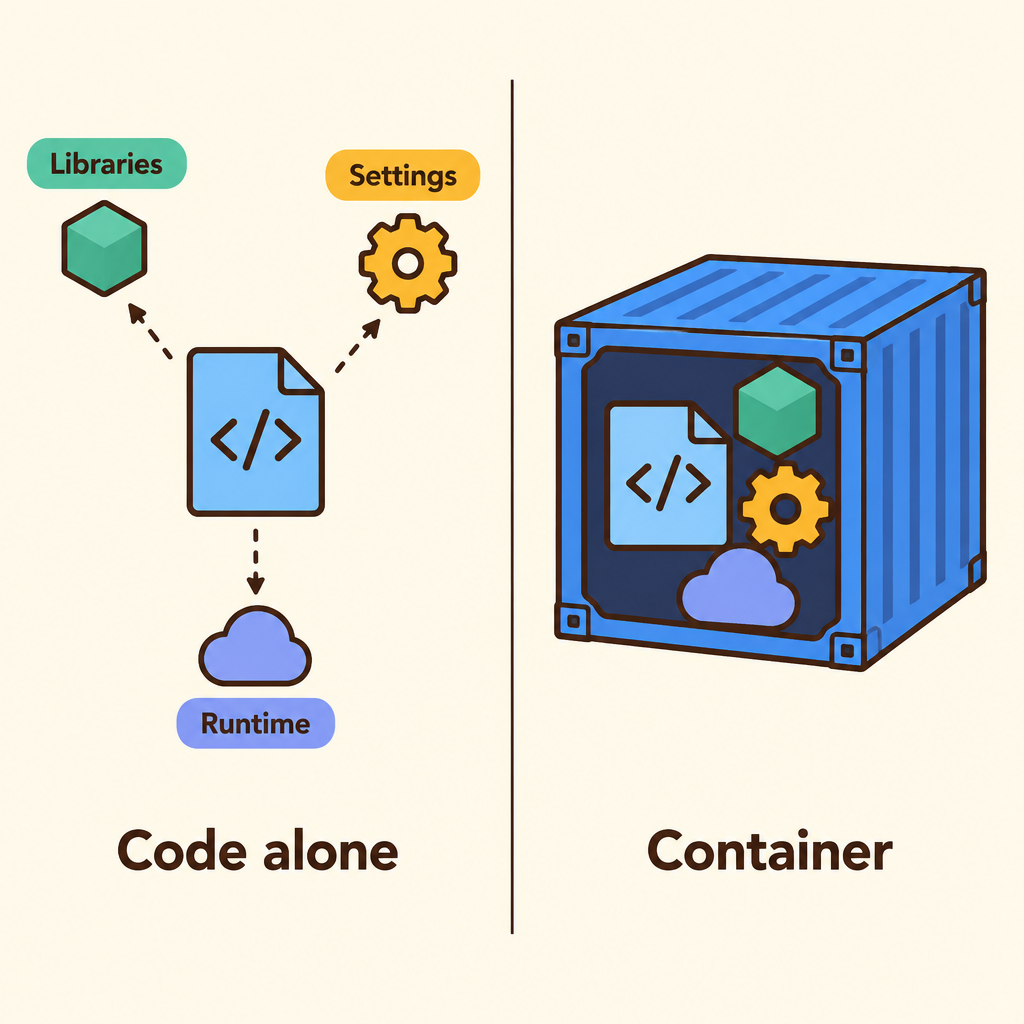
Notice that the sealed package carries the libraries, settings, and runtime components alongside the code, so nothing has to be found in the new environment.
Containers answer that problem directly. They package an application together with the files and dependencies it needs.
The result runs consistently across different environments.
What Lightweight Means
Containers are described as lightweight, portable packages for software.
Lightweight means they carry what the application needs to operate, without hauling along everything else.
Portable means the same package can move between machines and environments.
- Lightweight
- Portable
Together, those two traits are why containers travel well. A package that is heavy or environment-specific does not move easily.
Code Alone Is Not Enough
Here is the mental shift worth holding on to.
A traditional view treats an application as code alone. The container view groups the application with the supporting pieces around it.
Those supporting pieces are libraries, settings, and runtime components.
- Container: A lightweight, portable package for software.
- Application: The code itself.
- Libraries: Supporting code the application depends on.
- Settings: Configuration the application needs to operate.
- Runtime components: The pieces that let the application actually run.
When messaging says containers make software self-contained, this grouping is what it actually means.
The Journey To Production
Applications do not stay in one place. They travel.
Teams build in development, check behaviour in testing, then release to production. Each stop has historically been a chance for something to shift.
Containers help teams move applications more reliably across that path.
- Development: The application is built along with the libraries, settings, and runtime it needs.
- Testing: The same package is checked, so behaviour reflects the real thing.
- Production: The identical package is released, moving more reliably than code alone.
The package does not change as it moves. That is the whole point.
Consistency Is The Payoff
Ask what containers actually buy a team, and the honest answer is consistency.
The application runs the same way across different environments because its dependencies travel with it.
Consistency then turns into confidence. Teams release improvements with greater speed and confidence when fewer surprises wait in production.
- Dependencies included: Libraries, settings, and runtime components travel with the application.
- Consistent runs: The application runs the same way across different environments.
- Reliable movement: Applications move more reliably from development to testing and production.
- Speed and confidence: Teams release improvements with greater speed and confidence.
Speed on its own is not the story. Repeatable speed is.
Where Marketers Meet Containers
Containers sound abstract until you name what runs inside them.
They support faster, more consistent delivery of the digital experiences behind websites, campaigns, customer portals, and content platforms.
So the next campaign landing page, the portal a customer logs into, the CMS your team publishes from: these are the things containers help ship.
- Supported by containers
- Websites: Public-facing pages that need reliable updates.
- Campaigns: Time-sensitive experiences where delivery speed matters.
- Customer portals: Logged-in destinations customers return to.
- Content platforms: Systems teams publish from every day.
Containers support faster, more consistent delivery of each of these.
That is the bridge between engineering language and customer value.
A Foundation, Not A Product
A common misreading treats containers as a product you buy.
They are better described as a foundational idea behind cloud-native application development.
Think of them as the base layer. Higher-level platforms and practices build on top of that packaging idea.
- Faster delivery: Digital experiences reach customers with greater speed and confidence.
- Cloud-native development: A way of building applications that containers help make possible.
- Containers: Lightweight, portable packages of application plus dependencies.
Each level rests on the one below.
Getting this right keeps your messaging accurate: containers enable the story, they are not the whole story.
Words That Stay Accurate
Marketing language drifts when the underlying idea is fuzzy.
Say packaged with its dependencies rather than vague promises about magic portability. Say runs consistently across environments rather than "runs anywhere, always".
Claim faster, more consistent delivery, because that is what the source supports.
Precision here is not pedantry. It is what makes a technical audience trust the copy.
Sit With This One
Containers did not add a new capability to software. They changed what gets shipped.
The code was always there. What changed is that everything the code depends on now travels with it.
That small shift in packaging is what unlocked reliable movement from development to production.
What To Carry Forward
A container is a lightweight, portable package holding an application plus the files and dependencies it needs.
Because the dependencies travel with the code, the application runs consistently across different environments.
That consistency supports more reliable movement from development to testing to production, and faster delivery of websites, campaigns, portals, and content platforms.
- Business payoff: Faster, more consistent delivery of digital experiences.
- Technical effect: Applications move more reliably from development to testing and production.
- The package: An application bundled with the files and dependencies it needs.
Each outer layer depends on the one inside it.
Containers are the foundation that cloud-native development builds on. Everything you learn next sits on top of this.
Check yourself
A container packages an application together with the files and dependencies it needs.
- True
- False
Answer: True
This statement is correct. Packaging the application with its dependencies helps it run consistently when moved between environments.
A container carries the application’s _____ and can move between machines because it is _____.
Answer: A container carries the application’s dependencies and can move between machines because it is portable.
Dependencies are the supporting pieces the application needs. Portable means the package can move between machines and environments.
A campaign landing page works in development but fails in production because a required library was not moved with the code. Which container benefit addresses this problem?
- More consistent operation across environments
- A complete replacement for marketing content
- A guarantee that the application runs without any files
- A product purchase that removes the need for testing
Answer: More consistent operation across environments
Containers package the application with its dependencies, such as required libraries. Those dependencies travel with the code, supporting consistent operation across environments.
Keep going
This is lesson 1 of 11 in Containers and OpenShift for Marketers. Next up:
- Container Images
- Image Registries
- Pods Explained
- Nodes Clusters
- Namespace Isolation
Wondering turns any topic into short lessons you can read, watch, or listen to, with practice questions and an AI tutor.