Free sample lesson · Claude Code for Product Work
Give Claude a Bounded Workspace
Could a booking-feedback task reach beyond your practice folder?
Lesson 1 of the Wondering course Claude Code for Product Work
Start in the Right Folder
Could a booking-feedback task reach beyond your practice folder?
For this exercise, use an empty folder containing no real customer data. In your terminal, run cd /path/to/project, replacing the placeholder with that folder’s path, then run claude. The documented startup steps are changing into a project and starting Claude Code.[[2]](https://code.claude.com/docs/en/common-workflows)
That folder is the session’s working directory.[[1]](https://code.claude.com/docs/en/how-claude-code-works)
Exclude real exports, credentials, and unrelated files.
Claude Code shows its current permission mode in a mode indicator. The mode sets when Claude Code asks for your approval. One mode is labeled Manual: it asks before file changes and most commands, while built-in read-only actions can run without approval.[[3]](https://code.claude.com/docs/en/permissions) Shift+Tab is the keyboard shortcut that switches to the next available mode, so repeated presses cycle through them. Keyboard behavior can vary by terminal.[[5]](https://code.claude.com/docs/en/interactive-mode)
Before creating anything, press Shift+Tab to cycle modes until the indicator says Manual.
- Change folder: Run cd /path/to/project with your empty practice folder in place of the placeholder.
- Run claude: Start the session from inside that folder.
- Session folder: The working directory becomes the session folder and supplies directory context.
- Exclude extras: Keep real exports, credentials, and unrelated files out of the folder.
- Inspect mode: Check the displayed permission mode and choose Manual before creating anything.
Folder and File Mean Different Things
Need to discover available inputs or read the feedback itself?
After the files exist, @inputs supplies a directory listing. It reveals entries but does not provide every file’s contents.[[2]](https://code.claude.com/docs/en/common-workflows)
@inputs/feedback.csv supplies that file’s contents. A CSV is a text table.
Use the directory reference to find files. Use the file reference to analyze feedback.
- @inputs
- @inputs/feedback.csv
Guidance Is Not Enforcement
Does writing Avoid unrelated folders in a prompt enforce it? Not by itself. Instructions in your prompt guide the model’s decisions; the model is not guaranteed to obey them.[[6]](https://code.claude.com/docs/en/best-practices)
When you run claude in a directory, Claude Code can access files in that directory and its subdirectories, plus files elsewhere with your permission, and it can run commands you could run in your terminal.[[1]](https://code.claude.com/docs/en/how-claude-code-works)
Access is controlled by permission rules, which are enforced by Claude Code, not by the model.[[3]](https://code.claude.com/docs/en/permissions) For example, Claude’s Read action opens a file. A deny rule can tell Claude Code to refuse that action for a named file. The application checks the rule when the action is attempted; a sentence in your prompt leaves the decision to the model.
- A workbench with access controls
Pause Before Approval
What will an unfamiliar command actually do?
In Manual mode, Claude Code requests approval for changes and most commands, with read-only exceptions.[[3]](https://code.claude.com/docs/en/permissions)
The approval screen lets you inspect a proposed command before execution.
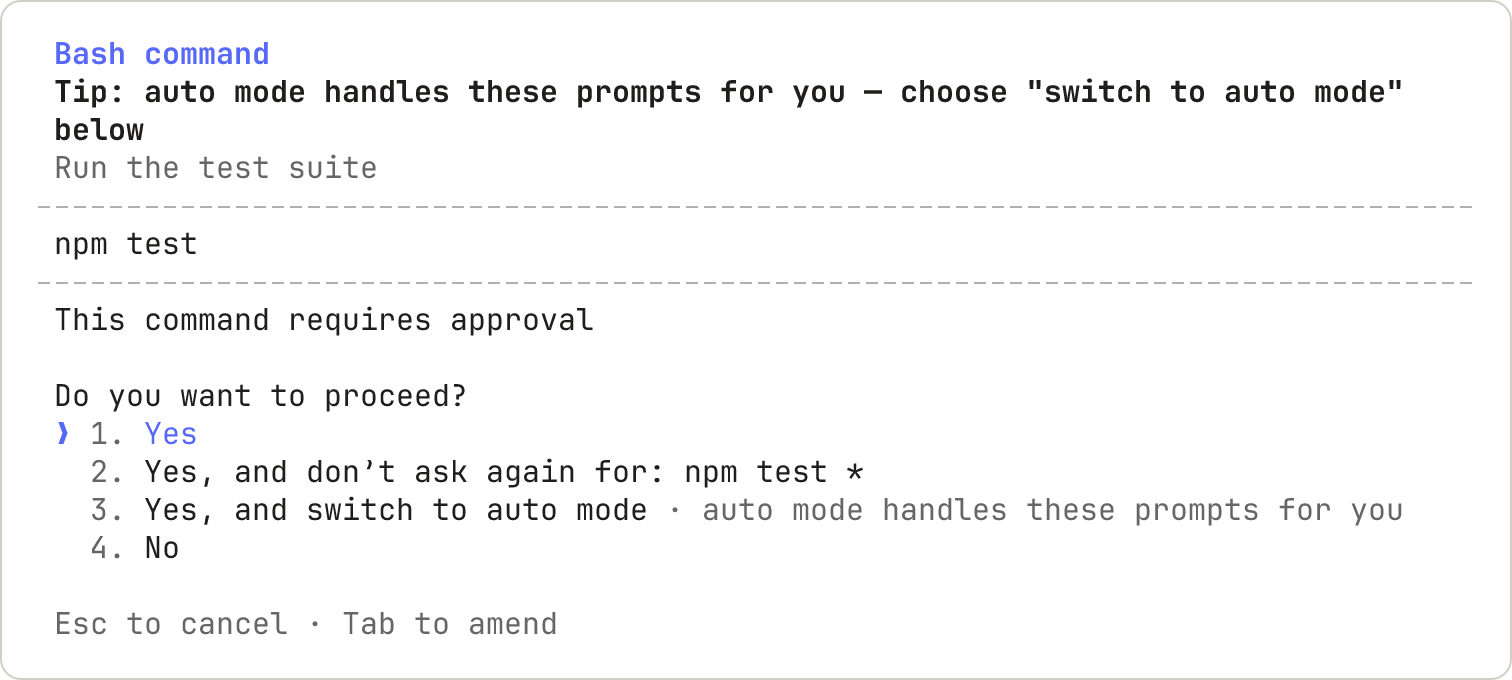
This official Manual-mode example shows the command and approval choices before execution. · Claude Code screenshot © Anthropic, from Configure permissions.
Open /permissions to review active rules. Deny means Claude Code refuses an action that matches the rule.[[3]](https://code.claude.com/docs/en/permissions)
Claude can also run a separate program that opens files. For example, Anthropic documents that a Python script can open files outside the Read-rule checks.[[3]](https://code.claude.com/docs/en/permissions) In this exercise, keep reviewing commands even after you see a Read action blocked.
Before approving, ask what the action reads, changes, and transmits. If you cannot explain an unfamiliar command, decline it and ask Claude to explain its effects before you reconsider.
Local Still Uses a Network
Could a local prototype still transmit data? Yes.
Claude Code runs locally, but model requests travel over the network, as the data flow shows.[[4]](https://code.claude.com/docs/en/data-usage)
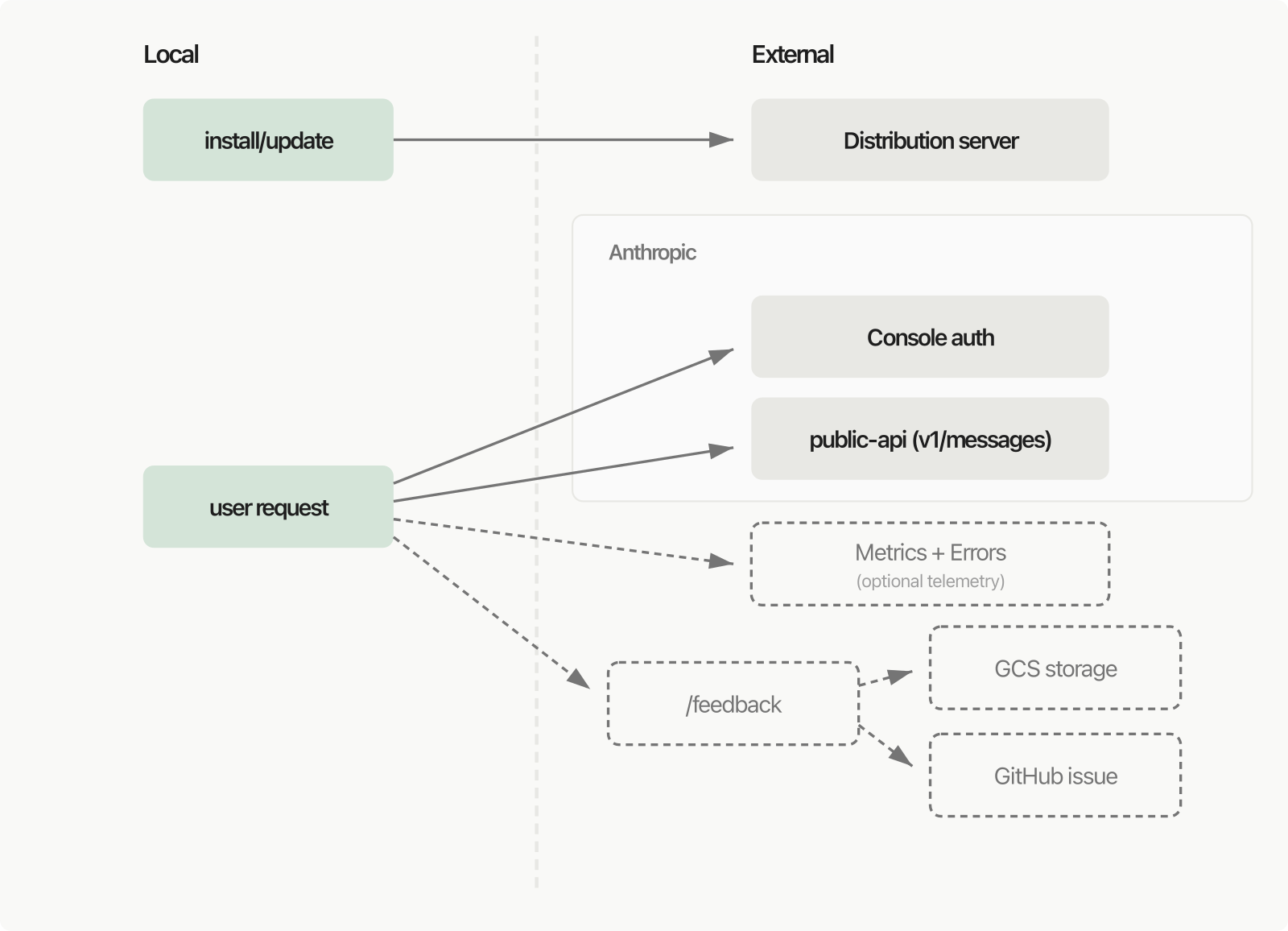
Anthropic’s data-flow diagram shows local Claude Code sending model requests across the network. · Claude Code data-flow diagram © Anthropic, from Data usage.
Local transcripts are also stored as plaintext.[[4]](https://code.claude.com/docs/en/data-usage)
Use synthetic feedback and exclude credentials or real exports. Reject any unexpected upload, unexplained network effect, or unrelated-file access.
Map and Verify the Workspace
Ask Claude to propose a workspace map, then save it as WORKSPACE.md after you review it. WORKSPACE.md is a text file of written guidance. Its written instructions guide the model; they do not replace configured permission controls.[[6]](https://code.claude.com/docs/en/best-practices)
Use this prompt: “Propose WORKSPACE.md containing these future paths: inputs/feedback.csv for invented comments; analysis/themes.md for findings; SPEC.md for intended behavior; prototype/index.html for the demo. Add: Use wholly invented data only. Do not create those other files yet.”
Review the proposed text. If it adds an upload or unrelated-file access, decline and ask for a corrected proposal. When the map is right, approve saving WORKSPACE.md. Open the saved file and confirm the four paths and invented-data rule are present.
- Request WORKSPACE.md: Name the four paths and the invented-data rule.
- Paths preserved, no extras?: Look for an upload or unrelated read.
- Approve proposal
- Decline and correct: Correct the request instead of accepting the change.
- Inspect resulting files
- Carry WORKSPACE.md forward: Bring it into the next step: analyzing the synthetic feedback.
- Yes
- No
- Verified
The next lesson supplies the fictional comments and creates inputs/feedback.csv. Start that task with “Read @WORKSPACE.md and follow its paths and invented-data rule.” You are passing a file reference, not asking Claude to remember an unstated instruction.
Check yourself
In a fictional practice session, Claude reads a local Markdown file and uses it in a model request. Which boundary should you expect?
- The file can be used in a network request even though commands run on this Mac.
- Starting in the project folder makes the model request stay offline.
Answer: The file can be used in a network request even though commands run on this Mac.
Local execution describes where commands run. Model requests still cross the network; the starting folder does not enforce offline processing.
You need to find which files are available in a booking project, then read the feedback. Which pair of references is correct?
- Use
@inputsto find files, then@inputs/feedback.csvto read feedback. - Use
@inputs/feedback.csvto find files, then@inputsto read feedback. - Use
@inputsbecause it automatically reads every file inside the folder.
Answer: Use @inputs to find files, then @inputs/feedback.csv to read feedback.
Use @inputs to see the directory listing and @inputs/feedback.csv to read the CSV contents. Referencing the folder does not read every file inside it.
In Manual mode, Claude Code proposes a command that may read an unrelated file. What should you do before approving it?
- Review its reads, changes, and network effects, then reject it if unrelated access is included.
- Approve it because commands from the session folder cannot reach elsewhere.
- Approve it because local execution means no data can travel over the network.
- Skip the review if the command only creates a small output file.
Answer: Review its reads, changes, and network effects, then reject it if unrelated access is included.
Inspect the proposed command and ask what it reads, changes, and transmits. If it accesses an unrelated file, do not approve it; a small starting folder is not complete isolation.
Keep going
This is lesson 1 of 6 in Claude Code for Product Work. Next up:
- Make Feedback Claims Traceable
- Write Requirements With Evidence
- Prototype the Missing States
- Verify What Actually Happened
- Recover and Hand Off Safely
Wondering turns any topic into short lessons you can read, watch, or listen to, with practice questions and an AI tutor.