Free sample lesson · Claude Code Configuration & Workflows
Place Persistent Instructions
Why did a new teammate miss every project convention?
Lesson 1 of the Wondering course Claude Code Configuration & Workflows
Overview of Persistent Instructions
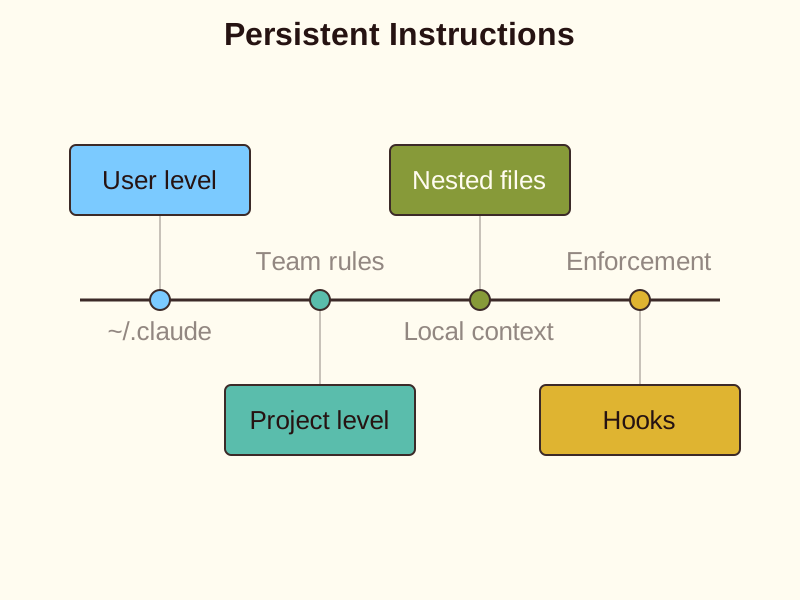
Learn how to configure Claude Code by structuring instruction scope, handling concatenated guidance files, and applying proper enforcement boundaries.
Right Place Right Audience
Instruction scope determines who sees your project guidance. A common mistake is keeping team conventions in a personal file.
User-level files at ~/.claude/CLAUDE.md stay on your machine. They do not follow the repository when a teammate clones it.
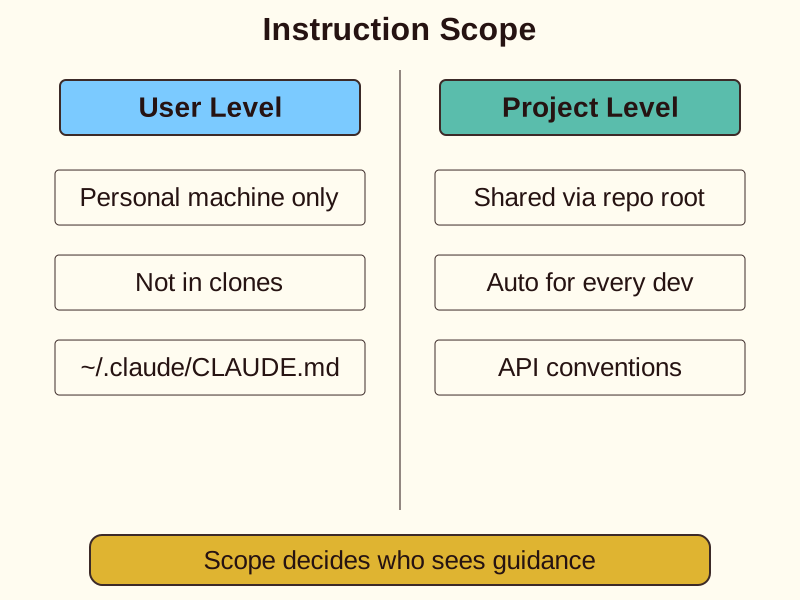
Move shared API conventions to the repository root. This ensures every developer receives the same context automatically.
Use nested files for specific subdirectories. This adds local context without cluttering the main project file.
How Instructions Combine
Claude Code does not use a priority system like CSS. Instead, it concatenates all discovered guidance files into one long context.
Conflicting instructions lead to inconsistent behavior. If your personal file says one thing and the project file says another, Claude might get confused.
- Discovery: Claude Code scans for all applicable guidance files across user, project, and nested directories.
- Concatenation: All discovered guidance files are concatenated into one long context without deterministic override rules.
- Verification: Use the memory command to inspect which files are currently loaded and active.
Check your active context with the /memory command. It shows which files are currently loaded.
- Instructions and auto memory differ
Guidance Versus Enforcement
Instructions in a markdown file are suggestions, not hard boundaries. They shape how Claude works but do not stop it from acting.
- Guidance (Markdown)
- Enforcement (Settings/Hooks)
Use settings or hooks for mandatory rules. A formatter that must run belongs in a hook, not just a text description.
Permissions and blocked tools require client-side enforcement. Do not rely on a CLAUDE.md file to secure your environment.
Reconcile contradictions by removing old wording. Clean instructions prevent the model from drifting between two different rules.
Organizing Large Instructions
Large instruction sets can become difficult to maintain. You can split them into smaller files for better organization.
Use the @path syntax to import these files. This helps you manage complex workflows without losing context.
Remember that imports do not reduce the cost of instructions. Every word still counts toward the total context window.
Keep your guidance focused. Shared knowledge belongs in version control, while personal preferences should stay in your user directory.
Putting It All Together
- Set Scope: Place shared conventions in the repository root CLAUDE.md so every developer receives them.
- Import Modules: Organize large instruction sets into smaller files and import them using the path syntax.
- Enforce Rules: Move mandatory security policies and formatters from markdown guidance into hooks and settings.
Check yourself
A developer adds personal workflow preferences to ~/.claude/CLAUDE.md. When a teammate clones the repository, _____ loaded on the teammate's machine.
- those personal preferences will not be
- those personal preferences will automatically be
Answer: those personal preferences will not be
User-level files reside at ~/.claude/CLAUDE.md on your local machine and do not follow the repository when cloned. Shared repository guidance belongs in the project root.
When Claude Code loads instructions, it scans for applicable files and performs _____ into a single context without applying deterministic override rules. To inspect which files are currently loaded, you can run the _____ command.
Answer: When Claude Code loads instructions, it scans for applicable files and performs concatenation into a single context without applying deterministic override rules. To inspect which files are currently loaded, you can run the /memory command.
Claude Code combines all discovered guidance files by concatenating them into one long context rather than resolving conflicts with CSS-like priority rules. The /memory command lets you verify which files are active.
A team needs to guarantee that code is formatted with a strict linter before commits and that unsafe tools are restricted. How should this requirement be implemented in Claude Code?
- Use settings or hooks for client-side enforcement rather than markdown text.
- Add strict imperative text to the root
CLAUDE.mdfile using bold headers. - Place the rules inside a user-level
~/.claude/CLAUDE.mdfile so they override project files. - Import the formatting rules using the
@pathsyntax into the subdirectories.
Answer: Use settings or hooks for client-side enforcement rather than markdown text.
Markdown instructions (CLAUDE.md) provide guidance and suggestions but cannot enforce hard boundaries. Mandatory rules, formatting requirements, and security restrictions must be implemented using client-enforced settings or hooks.
Keep going
This is lesson 1 of 6 in Claude Code Configuration & Workflows. Next up:
- Package Workflows as Skills
- Load Rules by Path
- Choose Plan or Direct Work
- Refine with Concrete Feedback
- Run Claude Code in CI
Wondering turns any topic into short lessons you can read, watch, or listen to, with practice questions and an AI tutor.