Free sample lesson · Claude Code Configuration, Hooks, and CI
Three Levels and a Local One
Developer B clones the repo and Claude ignores every API naming convention. Why?
Lesson 1 of the Wondering course Claude Code Configuration, Hooks, and CI
Mastering CLAUDE.md Configuration
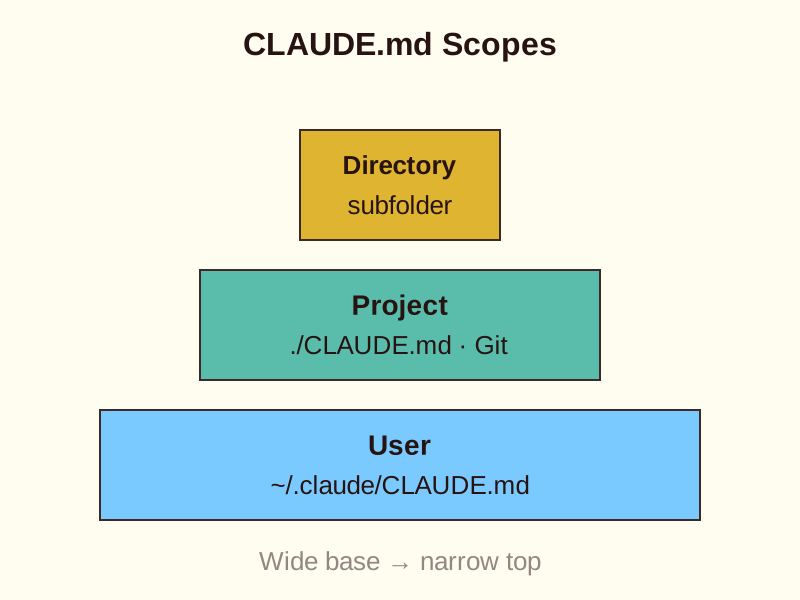
Learn how Claude Code discovers, loads, and overrides configuration files across user, project, and directory scopes.
The Three Levels of Claude Code
Claude Code looks for instructions in three specific places. The User level sits in your home directory at ~/.claude/CLAUDE.md. This file is for your personal preferences.
The Project level lives in the root of your repository. You can name it CLAUDE.md or put it inside a .claude folder.
The Directory level exists inside subfolders. For example, a file at /packages/api/CLAUDE.md only applies to work done in that specific folder.
Sharing Rules with the Team
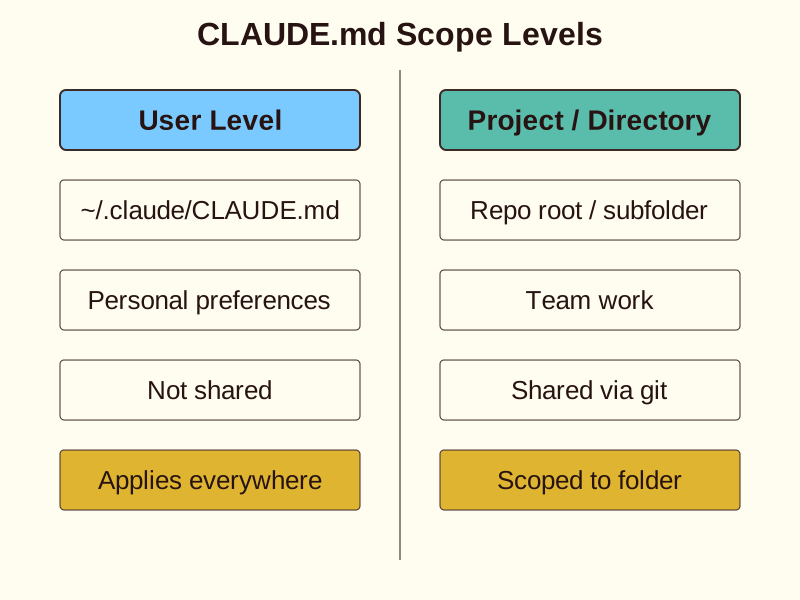
Only the project and directory levels travel through Git. Your team sees these files when they clone the repository.
User-level files stay on your machine. They are never shared with others.
If a teammate gets different results than you, check if your rules are stuck in your home directory. A common mistake is assuming a home directory file is project aware.
Hierarchy and Overrides
Claude loads these files in a specific order. A machine-wide managed policy loads first and cannot be ignored.
Next, Claude reads the user file, then the project file, and finally any directory-level files.
Directory-level files are precise. A file in the API folder might hold REST conventions that the frontend package never sees. This keeps instructions relevant to the current task.
- Managed Policy: Loads first and cannot be overridden by other files.
- User File: Reads personal preferences from your home directory.
- Project File: Applies root-level repository standards.
- Directory Files: Applies precise subfolder conventions for the current task.
The Local Override File
Sometimes you need project instructions that you do not want to share. This is where CLAUDE.local.md comes in.
This file can sit beside any CLAUDE.md file. By convention, it is added to your gitignore file.
It allows you to set local paths or private notes without cluttering the shared repository. It is a first-class location for managed instructions.
- CLAUDE.md
- CLAUDE.local.md
Putting It All Together
- Check User Scope: Claude loads personal defaults from ~/.claude/CLAUDE.md.
- Load Project Scope: Claude reads ./CLAUDE.md from the repository root shared via Git.
- Apply Local Override: Claude checks for CLAUDE.local.md to incorporate private workflow paths.
Check yourself
A user-level CLAUDE.md file located in a developer's home directory _____ shared with teammates through Git.
- is never
- is automatically
Answer: is never
User-level files (~/.claude/CLAUDE.md) store personal preferences on your local machine and are never tracked or shared via Git. Only project-level and directory-level files travel through Git.
Claude Code evaluates instructions in a strict sequence: first _____, then _____, next _____, and finally _____.
Answer: Claude Code evaluates instructions in a strict sequence: first managed policy, then user file, next project file, and finally directory files.
Claude Code loads configuration starting from system-wide managed policy, followed by your home directory user file, the repository root project file, and lastly subfolder directory files.
Developer A adds API formatting rules to ~/.claude/CLAUDE.md. When Developer B clones the repository, Claude Code ignores these formatting rules completely. What is the root cause?
- The rules reside in Developer A's user-level configuration file, which Git does not track.
- Developer B forgot to run the initialization command required to pull configuration files.
- Developer B missing an installed MCP server plugin required to parse directory rules.
- The project root CLAUDE.local.md file blocked remote user preferences from loading.
Answer: The rules reside in Developer A's user-level configuration file, which Git does not track.
The file ~/.claude/CLAUDE.md is at the user level, which sits in the developer's home directory and is not committed to Git. To share conventions with teammates, rules must be placed in a project-level file (such as ./CLAUDE.md) tracked by Git.
Keep going
This is lesson 1 of 10 in Claude Code Configuration, Hooks, and CI. Next up:
- Concatenation Is Not Precedence
- Imports Inline, Globs Scope
- Two File Shapes, One Command
- Arguments and Forked Context
- Pre-Approval Is Not Restriction
Wondering turns any topic into short lessons you can read, watch, or listen to, with practice questions and an AI tutor.