Free sample lesson · AI Software Engineering for Beginners
Page Structure
How do simple text tags turn into a polished portfolio website?
Lesson 1 of the Wondering course AI Software Engineering for Beginners
HTML Is the Skeleton
Every webpage you have ever opened starts as plain text with tags around it.
Those tags are HTML. They tell the browser what each piece of content is: a heading, a paragraph, a link, an image.
Python describes program logic. HTML describes the content and structure a browser displays.
- Python
- HTML
That difference is the whole idea behind this lesson.
Tags Mark Up Meaning
A tag wraps content and labels it.
Write a paragraph tag around a sentence, and the browser knows to render it as a block of body text. Write a heading tag, and it renders larger and heavier.
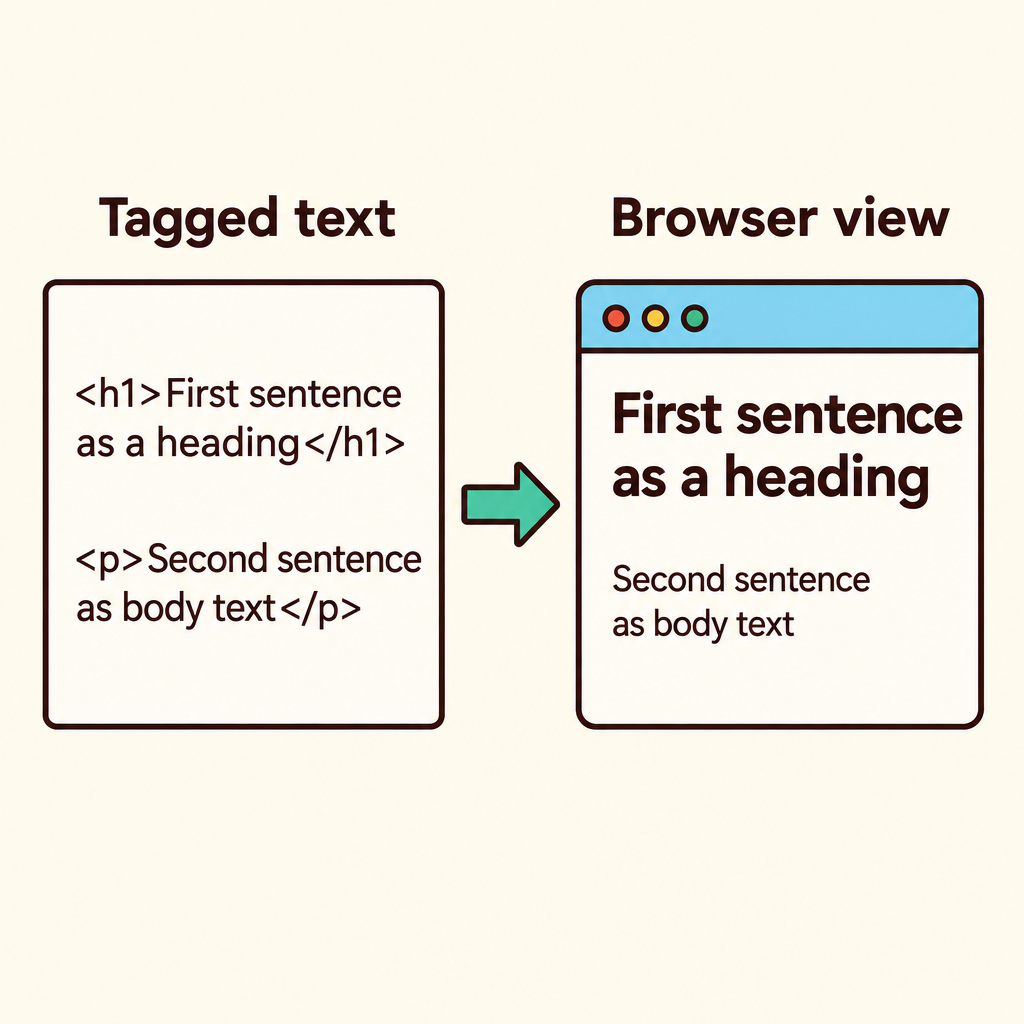
Notice that the same sentence appears in both panels; only the tag wrapped around it decides how the browser displays it.
The text itself does not change. The label around it changes how the browser treats it.
This is why HTML is called markup: you mark up text with meaning.
Elements With Clear Roles
Beginners often expect HTML to be one big pile of tags. It is not.
Each element has a clear role. Headings announce a section. Paragraphs hold body text. Links move the reader elsewhere. Images show visual content.
Page sections group related content together into meaningful blocks.
Pick the element that matches the meaning, not the one that looks right.
Structure Nests Inside Structure
HTML structure is nested. Bigger containers hold smaller ones.
The document holds the page body. The body holds sections. A section holds headings, paragraphs, links, and images.
If you have written nested data structures in Python, the shape will feel familiar.
- Document: The whole HTML page.
- Body: Everything the browser displays.
- Section: Groups related content together.
Nesting is what turns loose tags into an organized document.
Building a Portfolio Page
So how do simple text tags become a polished portfolio site?
You build it in order. Start with the document, add sections for your content, then fill each section with headings, paragraphs, links, and images.
- Document: Create the HTML document that holds the page.
- Sections: Add page sections for each meaningful block of content.
- Headings: Announce each section with a heading.
- Content: Fill sections with paragraphs, links, and images.
Nothing exotic happens along the way.
The polish comes later from styling. The structure comes first from HTML.
Why This Skeleton Matters
HTML is the essential skeleton behind every webpage and AI interface you will build.
Later you will build applications that use AI tools and APIs. Those interfaces still need headings, paragraphs, links, images, and sections.
Learn the structure once and it carries into every project.
Get the skeleton right, and everything you add on top has somewhere to stand.
Check yourself
HTML describes the content and structure a browser displays, while Python describes program logic.
- True
- False
Answer: True
This statement is correct. HTML organizes webpage content for the browser; Python expresses instructions and program logic.
A _____ announces a section, while a _____ holds ordinary body text.
Answer: A heading announces a section, while a paragraph holds ordinary body text.
Headings identify sections, and paragraphs contain regular blocks of written content. Each element has a different role.
A portfolio page needs text that takes visitors to another website. Which HTML element best matches that meaning?
- A heading
- A paragraph
- A link
- An image
Answer: A link
A link is the semantic choice for navigation to another location. Choosing an element by meaning is better than choosing one only for its appearance.
Keep going
This is lesson 1 of 13 in AI Software Engineering for Beginners. Next up:
- Visual Styling
- Client Scripts
- Tracking Changes
- Branching Workflows
- Server Basics
Wondering turns any topic into short lessons you can read, watch, or listen to, with practice questions and an AI tutor.